Thursday, January 31, 2013

Savi W410 Wireless PC Headset: Coming soon!


New from Plantronics is the Savi W410 wireless over-the-head monaural UC headset. This is a USB Wireless headset that allows a PC based office or Remote worker the freedom and accessibility to take calls while roaming the area. The unique design of the W410 increases portability and productivity without giving up any sound quality. It is one of the only PC-based wireless headsets with DECT technology that eliminates WiFi interference and incorporates noise-cancelling technology to filter out background noises. It connects to a PC or Mac via the wireless USB adapter and is ideal for business environments, campuses and remote work atmospheres.


 Similar to the rest of the Savi 400 series, the specifications are listed below:

 -          300ft Wireless range

-          9 hours talk time

-          One-touch call answer/end/flash, volume +/-, mute from headset for simple PC call management

-          Energy efficient adaptive power system, delivers long talk and standby

-          Wideband audio using CAT-iq technology for Hi-Def Quality

-          Noise Cancelling Mic ensures great audio quality

-          Enhanced Digital Signal Processing (DSP) provides more natural sounding voice.

-          Soundguard Technology ensure listening comfort and acoustic limiting for protection against audio spikes

-          Conference up to three additional Savi headsets.

 The Savi W410 is ideal for users that have a flexible work style and primarily use their PC for communications. It comes with a high quality carrying case for efficient portability for users who require wireless communications on the go. The headset is backed by Plantronics industry leading global service and support and comes with a full two year limited warranty. Wireless USB headsets have never gotten easier to use and with portability built into the design you will enjoy bringing this with you wherever you go.

Tuesday, January 29, 2013

The new Blackberry: Spec's and Speculations.


Research in Motion (RIM), the makers of Blackberrys, have for some time now been out of the limelight. They suffered a massive global operating loss of $643 million last year and fired co-founders Mike Lazaridis and Jim Balsillie. The wave of Apple and Android washed away RIM’s beloved contracts due to poor battery life, outages and outdated features. The new Operations Chief, Thorsten Heins, has been given the task of bringing RIM back to life. Their first unveiling is a make or break event being held on January 30th. This event will display their new operating system, two new smartphones and their new App store.

RIM’s main effort is to regain the market share, lost to Apple and Android, with their new operating system Blackberry 10. Here are some of the projected features:

-          Flow Interface: Their new interface is designed for smoother navigation and management.

-           Blackberry Hub: Their Inbox collects incoming messages of every kind(not just email).  Swipe to the right and you can see your inbox and all its functions.

-          Peek:  The name says it all, it lets you peek at other features without closing your app. Users will be able to view apps running in the background by swiping left or right. You can either return to the previous app or swipe back to go into previously launched programs.

-          Blackberry Balance: One of the most important features. Balance is part of the Blackberry Enterprise Server and allows IT administrators to deploy, secure and remove apps & data on the phone. The goal is to give IT admin’s control over corporate assets on employees mobile devices while leaving personal assets untouched. Balance partitions the phone in two; work and personal.  IT can wipe the enterprise section clean while leaving the personal section intact. This may be the perfect BYOD solution (How to BYOD).
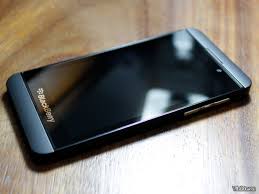


The Blackberry 10 OS will debut on two redesigned flagship smartphones the Blackberry Z10 and Blackberry X10. Both phones will be powered by a dual-core 1.5GHZ ARM Cortex A9 processor, have 2GB of RAM, an 8 MP rear camera with 1080p resolution, 2MP front facing camera with 720p resolution, TFT Capacitative Touchscreen, 32 GB expandable MicroSD, Lithium-Ion 1800 mAh battery, 802.11 a/b/g/n WiFi, Blutetooth (4.0?) and a micro USB port. The Z10 is a touchscreen only phone with a 4.2 inch display and traditional Blackberry users will enjoy the X10 with a 3 inch touch display and QWERTY keypad.
The camera is speculated to have features like Geo-tagging, touch focus, face detection, HDR, and LED flash. The more popular feature is the Blackberry 10 camera app with its 'Timeline' lens. With it, if you miss a photo by a couple seconds, you can cycle back through the cache and take your pick from the previous seconds worth of frames. So if one person is blinking, you can click their face, circle back to when their eyes are open and import that to the original. Very useful for group shots!
One of the major issues Blackberry faced was a lack of applications. They plan on changing that with their re-developed app store called Blackberry World. It will start with 70,000 apps and is said to have one of the most robust music and video catalogs in the mobile world. The music, movies and TV shows will be available from most major studios, music labels and networks. Movies will come to the store the same day they are released on DVD and current television series’ will have next day availability.

January 30th is a big day for RIM. They will try to reverse their fortunes and persuade lost Blackberry users to come back. This is a huge challenge given their past failures.  It could also substantiate a rebirth for the company. RIM needs to impress their audience; the future of their company depends on it. They are jumping to a modern platform and the skeptical consumers are eagerly waiting what is coming next. The true test of their success will come with how they present it and how functional their new products will be. Hopefully, the once mighty Blackberry will intrigue consumers enough to not end up like the Windows phone.

Thursday, January 24, 2013

Microsoft's Surface Pro, better than you thought.


The Surface Pro is not the RT. It’s a full Windows 8 machine powered by Intel. It is capable of running any desktop application, a powerhouse computing platform and priced to sell.  Pro will run applications more like a laptop than a traditional tablet. This device is designed to reinvent computing and bridge the gap between the two.
The Surface Pro offers a Core i5 CPU with an Intel HD Graphics 4000 GPU, 10.6-inch display,  64GB of storage, 4GB of RAM, USB 3.0, and mini display-port. Pro connects to monitors and outputs at resolutions beyond 1080p, and you can add Bluetooth and USB 3 peripherals like a mouse, keyboard, or external hard drive. The magnesium chassis is solid but not too heavy to hold in one hand( 2lbs). One difference between Pro and the thinner RT version is a vent for the internal fans to keep the powerful CPU running smoothly. It feels warm but no more than any other tablet.

Included is the Surface pen which magnetically attaches to the power connector to hold it in place. It has palm-blocking technology that activates the moment the Pro senses the pen nearing the screen. Palm-block eases the writing process by preventing your hand from shifting the stylus.


The keyboards come separately. The Touch Cover has sensors instead of physical keys and costs $120. The Type Cover has physical keys and costs $130. The Type/Touch keyboards draw power from the tablet and have a grip to hold the whole Surface from the cover.

This is the model that you buy if you want to get work done. You can use this as a tablet, or add the keyboard and turn it into a personal laptop.  With the $1000 price tag,  it’s competing against similar laptops and MacBook’s. Surface Pro seems well-positioned to rise to the top of the pack.

However, with the letdown of the RT, the Pro will have to regain its clout. People are approaching the Pro with caution due to past experiences with Windows touch devices. Inferior touch screens, poor battery life, and limited Bluetooth peripherals have left us with a bad taste.  A simultaneous release would have been better served, especially due to the lackluster holiday sales of only 1 million RT’s sold.

The Surface Pro is a more significant product though because it is likely to be the most popular bridge between laptop and tablets. It starts at $899 for 64GB of storage, or $999 for a 128GB configuration and will be available at Microsoft’s online store, Staples and Best Buy.

Tuesday, January 22, 2013

Solutions to BYOD

Solutions for BYOD Implementation: Part 3


BYOD allows employees to use personal devices to access service and data on the corporate network. Breaking the ties from your stationary desk helps you become a mobile worker that will expand capabilities of productivity and efficiency. Accessibility to work wherever you go detracts from project build up and missed opportunities.

Every great trend has some concerns though. Issues with BYOD can consist of possible theft, malware uploads and competing security measures that can ultimately fail. All of these can lead to corporate data being leaked into the wrong hands. Here are some options for bypassing these threats.

A strict policy that states the rules and regulations of how you are able to use your personal device on the corporate system is critical. IS managers have realized they must do more to understand the security of the technologies behind the trend. This may perpetuate control of how your personal device can be used on their system. Their rules may state that you must use their security software or tell you that you cannot download, install or upload any apps, files or widgets to your device. Controls may also be setup to restrict access to certain websites. These parental style constraints are implemented for the safety and security of the corporate network. A solid BYOD policy will help ensure network security but at the cost of some of your privacy.

The best solution is to work through a Virtual Private Network (VPN). This allows you access to your work computer by logging in through a remote connection. It creates a virtual link (or bridge) from one device to another. Remote connections deliver user applications to numerous devices without breaking policies of transmitting secure data. Due to this no information leaves the corporate network. Much like logging into your Facebook page, you can make and save changes on your profile but cannot manipulate the network code. It is safe, secure and doesn't impede on your personal devices' software or settings. 


Both of these are sound practices that are being utilized in both the corporate and government sectors. The policy may meet your approval, or your remote connection may solidify your needs. Either way, more and more people are realizing that they can become more productive and efficient at their job by participating in BYOD practices. These people may need a memo about password protection, but otherwise they understand and reap the benefits. Mobility has made it's mark on the business world and its here to stay, if not evolve further. If you haven't asked your IT department about this yet, I'd say its time to join the mobile workforce and expand your opportunities. Solutions can always be found for problems and your fear may be holding you back.

Thursday, January 17, 2013

How to BYOD: Part 2 Issues


Part 2: The issues inherent with BYOD

IT departments all have a collaborative fear of having their security measures bypassed and their system hacked. It’s a nightmare to prevent and in some cases begins with a simple unfortunate accident from one of their employees. The employee may have left their laptop in a taxi, downloaded content from a malicious QR code, installed an untrusted third party application, or neglected to password protect their device.  No matter the case, there are numerous issues with BYOD.

What if you've lost your company’s network integrated smartphone. Best case scenario, nothing happens. Worst case scenario is that it has fallen into the hands of someone dishonest and they now have access to your corporate information. Statistically one in three BYOD users do not worry about password protection that would provide a first defense against invaders. The thief has now turned off your location services, downloaded your corporate info and taken your personal information (contacts, calendar, notes, CC info).

Tablets and laptops may have better security features but they are still vulnerable. You can get clever spam mail or a link from a friend directing you directing to malware. Your company laptop now has a secret beneath its surface called malware (or a virus) and because of its secret existence; you go ahead sending and receiving private corporate information. All the while, your packets are being copied and shared to hackers and scammers alike. Instead of being on your secured network at corporate headquarters, your device is independently distributing excel sheets with company.
Organizations also have no control over the security of external networks used by your personal devices. Broadband, WiFi and cellular networks are susceptible to eavesdropping and may compromise transmitted information.

If your IT department has implemented a BYOD policy they may not be realizing the affects it has on themselves. Now, instead of dealing with just the company owned issues, they are doubling their work. It could be said that its your phone so handle it yourself but having the device integrated on your company network ties an assumed responsibility to IT to find a solution. Employees will not understand the difference between a network, software, or hardware issue and will hound the IT department until its fixed. IT has enough issues already, do we really need to double or triple their efforts?

When you are asking to use your personal device for work purposes, I urge you to consider all the possible implications it will have. You may not like the results.

Wednesday, January 16, 2013

How to BYOD


Part 1: How BYOD may help companies and their employees.

Trending in business today is something called ‘Bring Your Own Device’ or BYOD. It is the idea of bringing your personal laptop, tablet or smartphone to work and accessing the corporate database through remote connection or network implementation. Instead of solely using the corporate devices employees want to use something they are more familiar with. Many have found that cutting desktop ties to utilize mobile options is more efficent.  As companies move forward we will see more policies and technology that will bridge the gap between work and home.

Think about it, in today’s world its becoming a bit ridiculous to carry a separate work and personal phone. Employees want to use their smartphone as their only phone. The idea of balancing work and life merges with BYOD. Instead of having a separate office at work, you can take the abilities of your corporation with you wherever you go. User’s take more responsibility with their devices because they feel ownership over it.

Companies see cost benefits because employees pay for their own devices. This idea saves the company money, gives employees more flexibility, and makes both parties more productive. The IT department relinquishes control of the unit and the employee gives up some of their dependence on the IT department (I think we all know the IT departments will appreciate less dumb questions).

There is something to be said for employee satisfaction and productivity. If they feel like they have control over their equipment then they own their job. Being independent of control enables them to think about what they want and how to get it. BYOD may see more personal activities during work hours, but it also institutes more work during personal hours. The time frames don’t change but the process of which we work does.  I, for one, like the idea of checking my work emails making breakfast. Once I get to work, I can go right into what I need to do instead of checking the backlog for the first 30 minutes.

Some relish the idea of having a separate environment for work so as not to impede on their personal lives. Others have already incorporated BYOD practices. It’s all dependent upon what works best for you. The option of having this however, has been proven to save cost, increase flexibility and made employees more productive as a whole. There are, of course, security risks involved but for now this has been an idea to make your job responsibilities run much smoother.

Friday, January 11, 2013

Why VoIP is Advantageous


VoIP Networks: The advantages of the new Telephone Standard.

Cisco IP Phone 7975G, Spare, CP-7975G Cisco IP Phone, CP-7975G

Voice over IP (VoIP) refers to a way to carry phone calls over an IP data network. It routes voice calls over the internet rather than through a traditional packet switched telephone network.  It has become the standard for phones and services and has driven the plain old telephone system in to retirement.  The innately innovative design of this system carries with it numerous advantages the best of which is lower cost to consumers. With AT&T trying to drive out POTS systems, VoIP is soon to become the sole standard for voice communications.

Compared to POTS, VoIP offers many advantages like better sound quality and lower cost.  With it you can make a telephone call to anyone on the globe and the cost is included in your internet bill.

For businesses, branch offices are allowed to maintain a local number to the main office which curtails long distance fees and other telephone expenses. If your employees want to work remotely this technology easily gives them the atmosphere of being in the office and the environment that their customers enjoy.

 VoIP services save businesses significant amounts of time, money and resources that might otherwise be tied up on a landline based phone. Converting can save on long distance, operating costs, maintain a simple infrastructure and manage their communications more efficiently. In addition to being faster, less expensive and more convenient; all VoIP system maintenance is done by the same people that handle all IT and computer networking tasks.

Most of the cost of VoIP services previously involved connecting back to the plain old telephone system. Now that the majority of phone users have switched to VoIP it will no longer be necessary to make use of the old service.  

Two months ago AT&T petitioned the FCC to plan for the retirement of traditional phone networks and transition to an all IP platform. They had been discussing it internally, egged on by the FCC suggestion that the Public Switched Telephone Network may completely die out by 2018. The transition will incorporate only a couple standards of the old system like sustained connections and 911 services.

An all IP network lacks traditional circuit switching, will shed the complexity, save money and content conveyance will all be delivered using the same technology. Many customers have already ditched landlines for cell phones and VoIP services.

Traditional phone systems are getting harder to maintain and are a more expensive platform that doesn’t suit our technological civilization any longer. VoIP has been around for some time, and it seems our society has come to the conclusion to fully embrace its benefits. It’s about time to get rid of the plain old telephone system after a century. VoIP and IP are now the reigning champs.